
A parallel error occurs when two people try to book and complete payment for the same time slot at almost the same moment. Since only one person can successfully reserve that slot, the system confirms the meeting for the first completed booking and marks the other as a parallel error and cancels that booking to prevent double booking.
This usually happens when a slot has very high demand and multiple people attempt to book it simultaneously.
A real-world example
Let’s say Alex and John both try to book a meeting at 3:00 PM.
Alex payment went through at 3:01:05 PM.
John payment went through at 3:01:07 PM (just 2 seconds later).
Alex’s payment gets processed first and the slot is successfully confirmed for Alex.
By the time John’s payment is completed, the slot is already taken. In this case:
John’s booking is marked as a parallel error and gets cancelled.
John sees a message explaining that the slot was booked by someone else.
John is given the option to book another available slot.
If John books another slot within 3 days, the already paid amount is automatically applied.
If John does not rebook within 3 days, the refund is initiated automatically and credited within 2–3 business days.
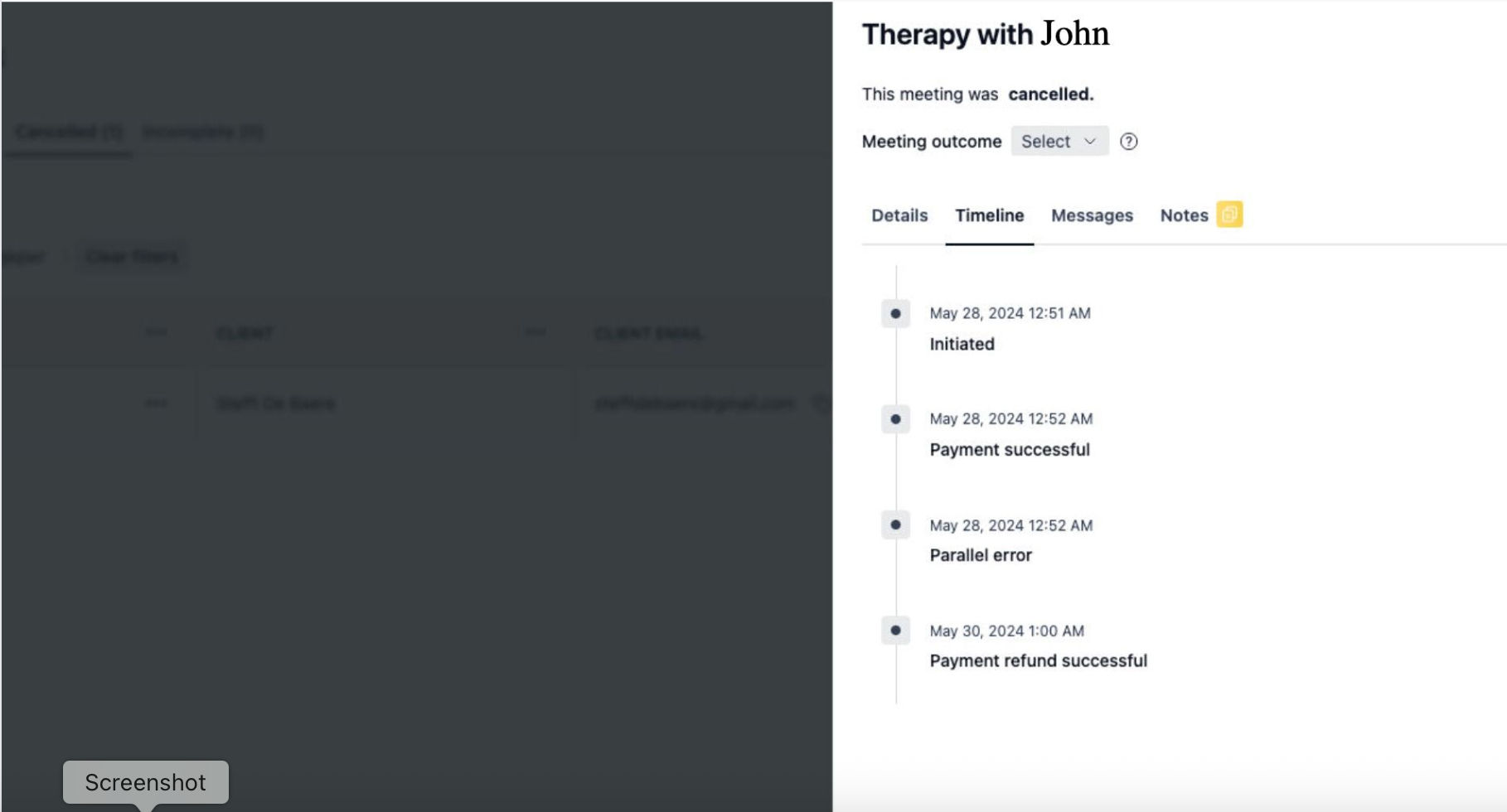
How parallel booking errors are handled
The handling depends on whether the meeting is paid or free.
For free meetings
In free meetings, the parallel booking error is handled immediately during the booking process.
If two clients try to book the same slot:
One booking will succeed.
The other will fail instantly.
The second client will see an error message directly on the booking page.
The error message will say:
“Sorry! The slot that you've selected already got booked by someone else. Please book another slot.”
No email is sent in this case because:
No payment was involved.
The error is shown immediately while the client is still on the booking page.
The client can simply choose another available slot and try again.
For paid meetings
Parallel booking errors in paid meetings are handled differently because payment is involved.
This usually happens when:
One client completes the payment.
But another client also books the same slot at the same time, a bit earlier.
When this situation happens, NeetoCal automatically prevents double booking and confirms the meeting for one user and cancels it for the other and updates the booking status to Parallel error for cancelled booking.
NeetoCal also:
Notifies the client whose meeting gets cancelled due to a parallel error.
No host assigned for that meeting.
Logs the error internally for tracking.
How clients are notified when a paid booking fails due to a parallel error
On the booking confirmation page client sees:
A message stating the booking conflicted with another meeting with a description explaining that the selected slot was booked by someone else.
The selected booking date and time are displayed with a strikethrough style to show it is no longer valid.
The client is informed that the payment is safe.
They can book another slot within 3 days and the payment will be automatically applied.
If they do not rebook within 3 days, a refund will be initiated and credited within 2–3 business days.
A Book Now button to select another slot.
An email is also sent to the client
The client receives an email with the subject:
“Your booking failed for the slot on {slot_date_time}.”
The email explains that:
The payment was successfully made.
Although the slot was booked by another client before confirmation.
The payment is safe and does not need to be made again.
The client can book another slot within 3 days using the provided link.
If they choose not to rebook, the refund will be initiated and will be credited back in 2-3 business days.
The booking ID is also included for reference.
A Book another slot link is provided.
Note: The email is sent only if the booking includes a payment.
Why does this difference exist when handling parallel error
The difference in handling exists because:
Free meetings do not involve payment. The system can reject the booking immediately and show an error message.
-
Paid meetings involve payment confirmation. If payment succeeds but the slot is taken by someone else during that short window, then NeetoCal must:
Protect the client’s payment.
Notify the client.
Provide a rebooking flow or issue refund.